Hermes WebUI Review

7.3/10

A self-hosted browser interface for running Hermes Agent from desktop or phone.

Review updated June 2026 By The AI Way Editorial 5 min read
Hermes AI Agents Autonomous Agents Open Source Self-Hosted

Our Verdict

Hermes WebUI is worth listing separately from Hermes because it solves a different problem: making a self-hosted agent usable from a browser and phone without giving up the local Hermes setup. The value is strongest when you already want persistent memory, cron, skills, and messaging, but need a visual control surface for sessions and files. The main cost is operational: if Docker volumes, SSH tunnels, model keys, and local services sound like chores, this will feel like infrastructure before it feels like an app.

Official site
Public pricing is not confirmed. Verify it on the official site.
open_in_new Visit Hermes WebUI

What people keep saying about it

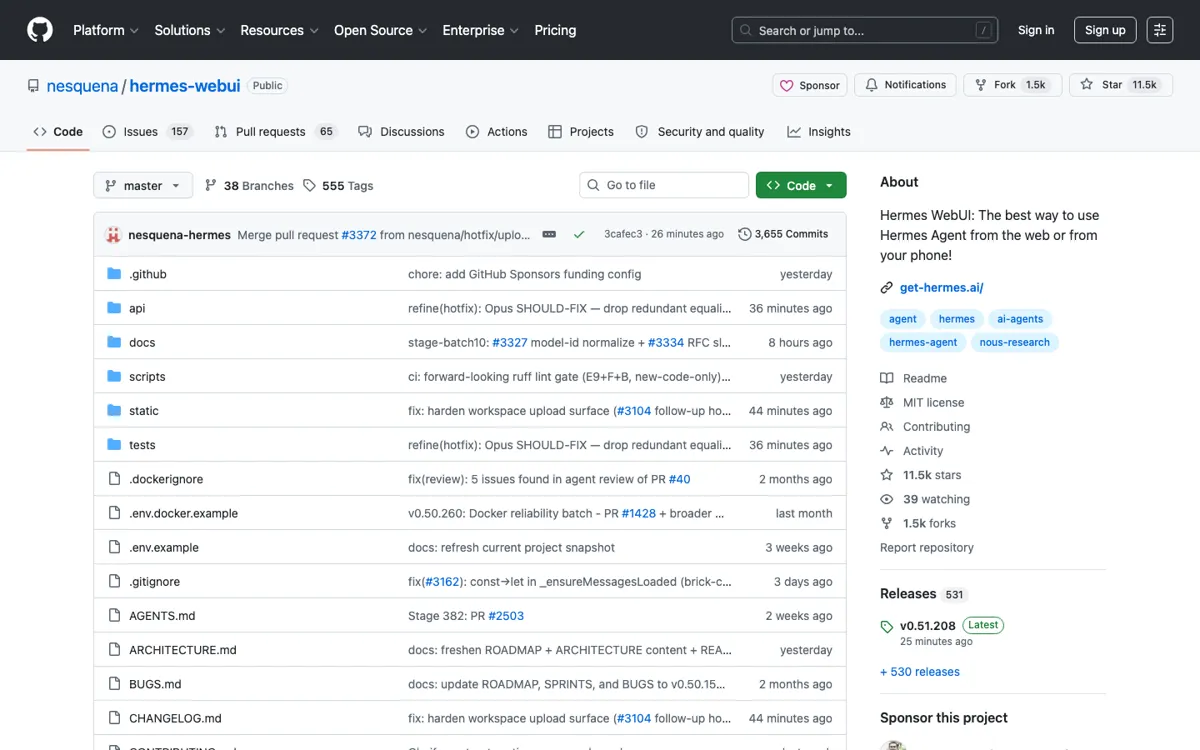
The strongest public signal is momentum: the 2026-06-02 discovery run caught +945 stars in one day, and the GitHub API recheck showed 11,466 stars and 1,464 forks. The praise centers on getting a cleaner browser and phone surface for Hermes. The friction shows up in GitHub issues around Docker mounts, container boundaries, native Windows setup, and confusion between the WebUI service and the Hermes Agent gateway.

Official Website Snapshot Visit Site ↗

check_circle Pros

  • It turns Hermes from a terminal-first agent into a browser workspace with sessions, chat, workspace files, profile controls, and visible context state.
  • The repo avoids a frontend build chain, so running the UI is closer to starting a Python app than maintaining a separate React-style stack.
  • It keeps the WebUI tied to the user's existing Hermes Agent and model setup, which matters for people choosing Hermes for self-hosting and data control.

cancel Cons

  • It is not a standalone hosted product; you need Hermes Agent, model/provider access, and a working local or server deployment before the UI matters.
  • Docker and multi-container setups can confuse users because chat turns may run inside the WebUI container while gateway work runs elsewhere.
  • Public pricing is not presented as a normal SaaS plan, so the real cost is hidden in hosting, model providers, and the time spent operating the stack.

Should you use it?

self-hosted Hermes users who want chat, sessions, and workspace files visible in one browser workspace

Skip it if: you want a hosted AI chat app with signup, billing, and no server work

Is it worth the price?

Pricing not confirmed

There is no verified SaaS pricing ladder for Hermes WebUI itself. Treat the repo as free-to-run open-source software, then budget separately for the machine that hosts it and the model provider or subscription you connect to Hermes.

One thing to know before you start

Install Hermes Agent first, then test WebUI on localhost before exposing it from a server. If you use Docker, decide early whether you are using one-container, two-container, or manual services, because volume paths and where chat turns execute change how debugging feels.

What people actually use it for

Give a self-hosted Hermes Agent a real browser workspace

Hermes WebUI fits the user who already has Hermes running but wants more than a terminal chat loop. The browser surface puts sessions, chat, workspace files, and profile context in one place.

Use the same agent from a remote server or phone

The WebUI makes sense when Hermes runs on a VPS, homelab box, or always-on machine and you want to reach it from another device. It works best for people who value self-hosting enough to handle the access layer themselves.

Debug and manage Hermes sessions with more visual context

Terminal sessions are fast, but they are not always the easiest place to inspect ongoing chats, workspace files, profile state, and token context. Hermes WebUI gives those pieces room on screen, which helps when you are asking the agent to work across a repo or a server environment. The value drops sharply if your work is only occasional one-off prompting, because the setup overhead then outweighs the visual convenience.

What does Hermes WebUI actually do?

Hermes WebUI is not trying to replace Hermes Agent. It is trying to make Hermes easier to live with once the agent is already part of your setup. The useful change is simple: sessions, chat, files, and profile state stop living only in a terminal.

The risk is that WebUI can look simpler than it is. GitHub issues show real confusion around Docker mounts, where Hermes home lives, and what the WebUI and agent containers are each responsible for. If that sounds like noise, this is the wrong kind of browser UI for you.

What you can do with it

Use Hermes Agent from a browser with chat, sessions, workspace browsing, and profile controls.
Run a three-panel layout with sessions, chat, and file browsing side by side.
Start locally with bootstrap.py, start.sh, ctl.sh, or Docker.
Tunnel the UI from a VPS or homelab machine to another computer or phone.
Reuse the existing Hermes Agent setup and models instead of creating a separate hosted account.

Technical details

access_model
Common setup is localhost:8787 with SSH tunnel or Tailscale-style remote access for a VPS, homelab server, desktop, or phone.
backend_shape
Python WebUI service that connects to an existing Hermes Agent setup instead of running as a separate hosted assistant.
frontend_shape
Vanilla JavaScript, CSS, and HTML browser UI with no frontend build step, framework, or bundler.
container_modes
README documents single-container, two-container, and three-container Docker paths, plus bootstrap.py, start.sh, and ctl.sh local starts.

Top Alternatives to Hermes WebUI

If Hermes WebUI is close but still misses the job, try one of these instead.

Key Questions

Is Hermes WebUI the same product as Hermes Agent?
No. Hermes Agent is the underlying self-hosted agent system; Hermes WebUI is the browser interface built around using that agent from a desktop or phone.
Can Hermes WebUI be used without running Hermes Agent?
No, not in the way the product is meant to be used. The WebUI depends on an existing Hermes Agent setup and reuses that agent, its models, and its local state.
Is there a public paid plan for Hermes WebUI?
No verified WebUI SaaS pricing page was found. The cost to plan for is hosting plus the model or provider access you connect to Hermes.
Who should avoid Hermes WebUI?
Avoid it if you do not want to manage a local service, Docker or server setup, model keys, and remote access. A hosted assistant is easier when self-hosting is not part of the goal.