Open Notebook Review

7.5/10

Self-host a private NotebookLM-style research notebook with your own AI models.

Review updated June 2026 By The AI Way Editorial 4 min read
Open Notebook BYO Key Note-Taking Open Source Self-Hosted

Our Verdict

Open Notebook is the better bet when NotebookLM's source-grounded notebook idea is right, but Google hosting and fixed model choices are the wrong trade. Its value is control over sources, model providers, podcast generation, and deployment. The cost is setup time: Docker, API keys, model defaults, and occasional open-source maintenance are part of the deal.

Official site
Public pricing is not confirmed. Verify it on the official site.
open_in_new Visit Open Notebook

Open Notebook vs NotebookLM

The real decision branch is whether the user wants Google's hosted source notebook or an open-source, self-hosted notebook with model choice. NotebookLM wins on convenience and polished source handling; Open Notebook wins when privacy, BYO models, podcast control, and deployment ownership matter more.

Open Notebook

Private research notebooks where you need source Q&A, custom summaries, podcast-style review, and control over which model sees which material.

NotebookLM

students, researchers, and knowledge workers turning a fixed source pack into notes, audio, and study aids

Read the NotebookLM review →
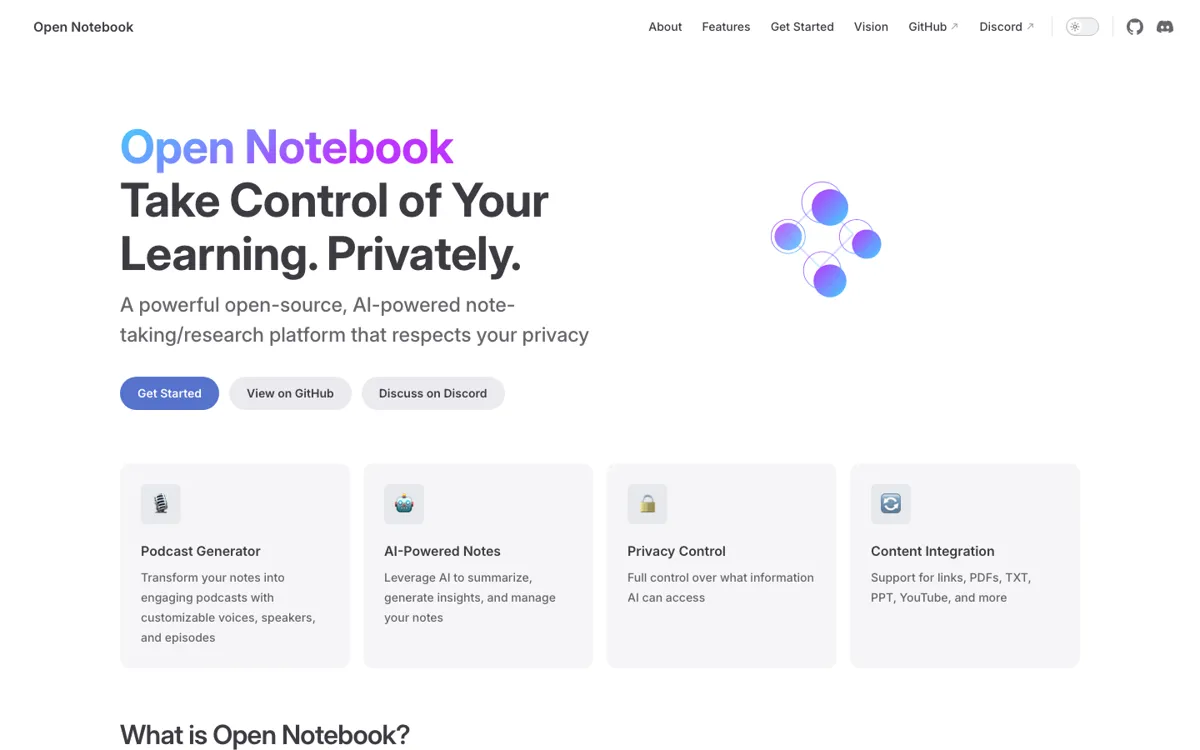
Official Website Snapshot Visit Site ↗

check_circle Pros

  • Lets you decide exactly which notes or sources are sent to the model for each question.
  • Covers more input types than a simple PDF chat tool, including YouTube, audio, video, Office files, EPUB, web pages, and markdown.
  • Turns the same research pile into notes, transformations, search results, cited answers, and podcast episodes.

cancel Cons

  • The setup path starts with Docker and model credentials, so it is a poor fit for people who want a hosted app in one click.
  • Pricing is not a normal SaaS plan; the real bill depends on the model providers and audio services you connect.
  • Citation quality is still a known weak spot compared with NotebookLM's source handling.

Should you use it?

Private research notebooks where you need source Q&A, custom summaries, podcast-style review, and control over which model sees which material.

Skip it if: you want a hosted notebook with no Docker, model keys, or maintenance work

Is it worth the price?

Pricing not confirmed

There is no public SaaS pricing page to compare plans against. The practical free path is strongest for people who can self-host and use local or already-paid model access. Heavy transcription, text-to-speech, large-context answers, or premium chat models will turn the cost into a provider-by-provider meter.

One thing to know before you start

Keep the first setup narrow. One notebook, one cheap transformation model, and one stronger chat model will tell you quickly whether the product fits your reading pile.

What people actually use it for

Build a private research notebook

Put papers, web articles, PDFs, and notes into one notebook, then ask questions while choosing whether the model sees summaries or full source content.

Turn a backlog into reusable notes

Save useful source insights and AI answers as notes, then search them later with keyword search or vector search instead of rereading every item.

Create study podcasts from source material

Use notes and assets as podcast context, then set speakers, voices, language, episode style, and length for audio review.

What does Open Notebook actually do?

The clearest reason to use Open Notebook is control. You decide which sources enter context, where the data lives, and which models handle different jobs. That matters when a hosted notebook is easy to start but too opaque for private research, client material, or internal notes.

The hard boundary is operational. Docker, model keys, and ongoing maintenance are part of the deal. That setup buys flexibility across providers and media types, but it also means this is a research stack to run, not a frictionless note app.

What you can do with it

Create separate notebooks for topics and attach source material to each one.
Add URLs, PDFs, EPUB files, Office files, markdown, TXT, YouTube videos, local video, and audio recordings.
Choose whether a chat sees no source context, only summaries, or full content before sending a question.
Run full-text search and vector search across notes and sources.
Write custom transformations that turn source text into summaries, key points, reflection prompts, or other reusable outputs.

Technical details

platform
Self-hosted web app with Docker setup recommended; source installation and manual setup are also documented.
deployment
Runs locally, with Docker, or in a cloud environment chosen by the user.
model_stack
Uses separate model roles for chat, transformations, large-context processing, embeddings, speech-to-text, and text-to-speech.
api_available
Full REST API access gives self-hosted users an automation path that NotebookLM does not expose.
content_pipeline
Processes links, YouTube transcripts, PDFs, DOC/PPT/EPUB files, local audio, local video, and pasted text into notebook sources.

Top Alternatives to Open Notebook

If Open Notebook is close but still misses the job, try one of these instead.

Key Questions

Is Open Notebook a NotebookLM alternative?
Yes, but the trade is control for setup work. It follows the source-notebook pattern while adding self-hosting, model choice, custom transformations, REST API access, and configurable podcast generation.
Does Open Notebook run locally?
Yes. The documented setup centers on Docker, with source and manual installation paths for people who want deeper control.
Which AI providers can Open Notebook use?
It can use different providers for different jobs, including OpenAI, Anthropic, Gemini, OpenRouter, Ollama, ElevenLabs, Mistral, Deepseek, Groq, xAI, Vertex, and others listed in the model provider docs.
Is Open Notebook free?
The code is open source under the MIT License, but that does not make AI usage free. Chat, embeddings, transcription, and voice generation depend on the local models or paid provider APIs you connect.
What is the biggest reason not to use Open Notebook?
The biggest blocker is maintenance. If you do not want to run Docker, configure model keys, pick model defaults, and keep a self-hosted app updated, a hosted tool will feel much lighter.