Paseo Review

8.7/10

Control Claude Code, Codex, Copilot, OpenCode, and other coding agents from one app.

Review updated June 2026 By The AI Way Editorial 4 min read
Paseo AI Agents CLI Tool Open Source Self-Hosted Free

Our Verdict

Paseo is worth tracking if coding agents have moved from experiments into daily work. Its value is not that it writes code better than Claude Code or Codex; it gives those agents a shared control surface across desktop, phone, browser, and terminal. The cost is dependency sprawl: users still manage provider CLIs, credentials, model limits, local daemon security, and the judgement call of when remote mobile coding is helpful instead of unhealthy.

Official site
Free to start.
open_in_new Try Paseo

What people keep saying about it

The HN thread was active enough to matter: 90 points and 52 comments, with one user reporting a few days of successful use and another saying it unlocked multi-agent work. Praise centered on cross-device control, open source, and a single surface for several agents. Pushback focused on whether shipping from a phone is healthy, whether the interface is truly beautiful or just functional, and whether token/cost visibility is deep enough for long coding-agent sessions.

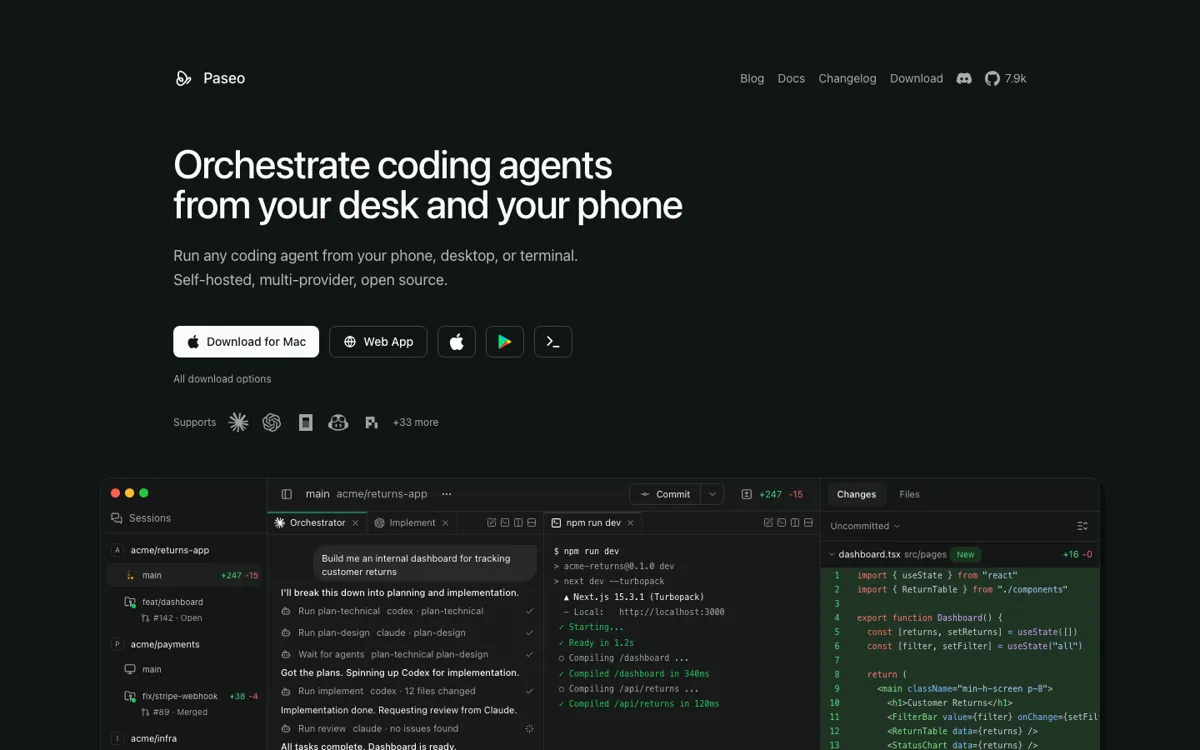
Official Website Snapshot Visit Site ↗

check_circle Pros

  • It keeps agent execution on the user machine while still giving remote control from phone, desktop, web, or CLI.
  • The provider list is unusually broad, so one surface can cover several coding agents.
  • It adds terminals, diffs, previews, logs, and worktrees instead of stopping at chat.

cancel Cons

  • You still need to install and authenticate the underlying agent CLIs yourself.
  • Phone-based control will feel freeing to some developers and exhausting to others.
  • The project is still early, so frequent upgrades are part of the deal.

Should you use it?

developers already running coding agents across local machines, VMs, or dev servers

Skip it if: you only use one editor assistant or want a fully managed hosted dev environment

Is it worth the price?

Free

Paseo itself is free and open source. The real cost sits outside the product: Claude Code, Codex, Copilot, OpenCode, Pi, or other provider subscriptions and API usage still apply, and heavy agent users should watch model spend even when the control app costs nothing.

The Free Tier

Paseo is free and open source; users still need their own installed provider CLIs and credentials for Claude Code, Codex, Copilot, OpenCode, Pi, or other agents.

One thing to know before you start

Start with direct local connection or a trusted private network before relying on the hosted relay. Then run one low-risk worktree task and check whether previews, diffs, PR actions, and mobile review actually reduce desk time without lowering review quality.

What people actually use it for

Monitor coding agents from a phone

A developer can leave an agent running on a laptop or dev server, then use the mobile app to check status, read messages, send follow-up instructions, or stop the session.

Run different agents for different steps

A team member can plan with Claude Code, implement with Codex or another provider, and review the result from the same workspace without switching between separate agent UIs.

What does Paseo actually do?

Paseo is aimed at the new problem created by coding agents: once several agents can work in parallel, the hard part becomes control. The product gives developers one place to start sessions, watch output, inspect changes, open previews, manage branches, and hand off work between providers. It is not trying to be the model or the IDE. It sits above installed agents and turns a laptop, VM, or dev server into a machine that can be steered from desktop, web, mobile, or terminal.

The strongest product boundary is local execution. Paseo does not send code to its own cloud service for execution; the daemon runs where the developer works, and each provider CLI handles its own credentials and model calls. Remote access can happen through direct connection, a private network, a tunnel, or the end-to-end encrypted relay. That makes the tool attractive for developers who want phone or browser control without moving their entire development environment into a hosted cloud box or rebuilding every project inside rented machines.

What you can do with it

Run supported coding agents from desktop, mobile, web, or CLI.
Control many native agent CLIs from one workspace.
Create worktrees, inspect diffs, preview services, and merge branches.
Reach the local daemon through direct links, tunnels, or relay access.
Use terminals, browser previews, logs, schedules, and voice input around sessions.

Technical details

agent_support
It is built to orchestrate many installed coding-agent CLIs.
runtime_model
A local daemon runs on the user machine, VM, or dev server.
client_surfaces
Desktop, mobile, web, and CLI clients connect to the same daemon.

Top Alternatives to Paseo

If Paseo is close but still misses the job, try one of these instead.

Key Questions

Is Paseo free?
Yes. Paseo is free and open source, but users still need their own Claude Code, Codex, Copilot, OpenCode, Pi, or other agent credentials.
Does Paseo run the coding agents in its own cloud?
No. The daemon runs on the user machine, VM, or dev server, and the provider CLIs run there with the user's existing credentials.
Can Paseo be used without the desktop app?
Yes. The desktop app bundles the daemon, but users can also install the CLI with npm, run the daemon headless, and connect from mobile, web, or CLI.
Does Paseo send code through its relay?
The relay can carry remote access traffic, but the security docs describe it as end-to-end encrypted, with the relay unable to read message contents or forge commands after pairing.