Marqly Review

7.8/10

Save links, auto-tag them with AI, and search your bookmarks by meaning.

Review updated June 2026 By The AI Way Editorial 4 min read
Marqly AI Search Chrome Extension Summarization Web-Based Freemium from USD 84.00/mo

Our Verdict

Marqly is strongest when your bookmark problem is retrieval, not saving. It turns a messy link pile into something you can search by meaning, tag, or context, with summaries and reader mode on top. The hard limit is pricing: the free plan stops at 50 bookmarks and excludes the AI layer.

Official site
A free plan is listed; verify current limits before upgrading. Starts at USD 84.00.
open_in_new Try Marqly
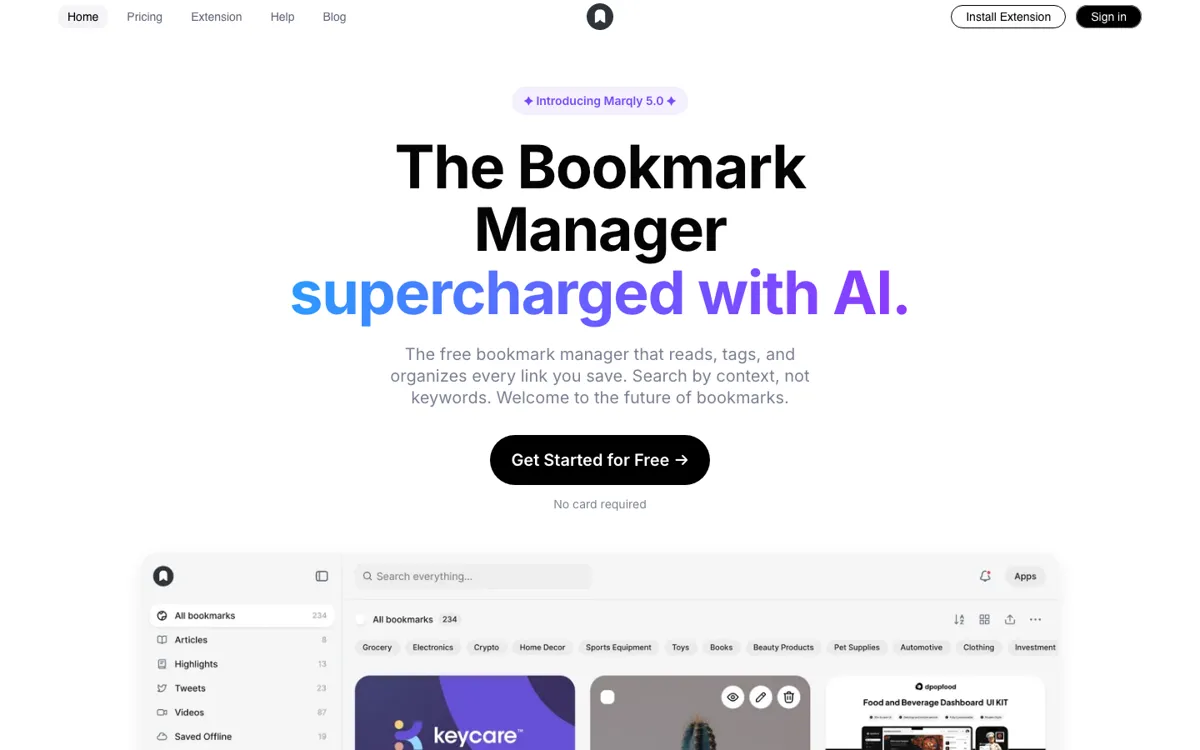
Official Website Snapshot Visit Site ↗

What people actually use it for

Recover articles when you forgot the headline

Save research links over several weeks, then search by the idea you remember instead of the exact title. This is the clearest Marqly use case because semantic search directly attacks the normal bookmark failure mode.

Replace bookmark piles with tagged boards

Move project links into boards or collections, let Marqly apply tags, and keep notes or highlights beside important pages. It works best for solo research piles that are too messy for folders but too small for a full workspace.

Turn saved reading into quick context

Use reader view and AI summaries when you need the point of a saved article without reopening every tab. This is useful for newsletters, tutorials, and comparison research where you mainly need enough context to decide whether to read deeper.

check_circle Pros

  • Semantic search helps when you remember the topic, not the headline or keyword.
  • AI tagging, boards, notes, and reader mode cover more than a plain bookmark bar.
  • Browser extensions and device access make daily saving feel lightweight.

cancel Cons

  • The free plan caps storage at 50 bookmarks, which is too small for anyone migrating an existing library.
  • AI-powered features sit behind Pro, so free mostly proves the interface.
  • Public technical detail is thin on export flow, API access, and AI processing.

Should you use it?

personal research and saved-link cleanup when you remember the idea, not the headline

Skip it if: you need team knowledge management, deep notes, or an API-first memory layer instead of a bookmark library

Is it worth the price?

Freemium Starts at USD 84.00

Free is fine for testing the interface or keeping a tiny link list under 50 bookmarks. The moment you want AI search, AI organization, boards, highlights, notes, or a migrated bookmark archive, Pro is the real plan. If 50 bookmarks sounds like a weekend of saved links, do not plan around the free tier.

The Free Tier

Free includes 50 bookmarks with basic search and tags

Paid Upgrade
$84/year billed annually

Pro unlocks AI features, unlimited bookmarks, boards, notes, and highlights

One thing to know before you start

Import one messy topic cluster first and test whether semantic search finds pages from the idea alone. If that fails, Pro will not fix the archive.

What does Marqly actually do?

Marqly makes the most sense as a bookmark rescue tool, not as a second-brain replacement. Its best move is letting you find saved pages by topic after the original context is gone, then giving you reader mode, summaries, and light organization around the link.

The main catch is that the free tier is really just a trial. Fifty bookmarks disappears fast, and the AI features live behind Pro. That is fine if you already know your saved-link pile is a problem, but it is weaker if you want strong export guarantees before moving a serious archive.

What you can do with it

Save links from Chrome, Edge, Firefox, or Safari.
Auto-tag bookmarks instead of sorting everything by hand.
Search by title, tag, URL, date, or semantic context.
Read saved pages in reader view with AI summaries.
Organize research into boards, collections, notes, and highlights.

Technical details

public_api
No public API was surfaced in the reviewed sources
mobile_access
Free and Pro both include mobile and tablet access
browser_support
Chrome, Edge, Firefox, and Safari extensions

Top Alternatives to Marqly

If Marqly is close but still misses the job, try one of these instead.

Key Questions

Is Marqly actually free?
Yes, but the free plan is capped at 50 bookmarks. It is enough to test saving, preview, tags, and basic search, but it is not enough for a serious bookmark archive.
What does Pro unlock?
Pro is where the main product shows up: unlimited bookmarks, AI powered features, boards and collections, highlights, notes, read mode, smart sorting, access anywhere, and priority email support.
Does Marqly replace Pocket or Raindrop?
It can replace them for solo users who mainly want AI tagging and semantic search over saved links. It is weaker if your must-have features are mature export controls, team workflows, or a long public track record.
Does Marqly have browser extensions?
Yes. Chrome, Edge, Firefox, and Safari are covered by the current extension or download links, so the main browser-saving path is not limited to one vendor.